
When creating or editing an envelope, senders can set whether recipients are allowed to change their name during the signing process, based on the administrator’s configuration. This setting applies to scenarios where recipients are required to complete signatures or identity verification.
I. Feature Overview
When a recipient’s name may differ from their ID document name or commonly used signature name, senders can allow recipients to change their name during the signing process. After enabling, recipients can adjust their name according to the actual situation when adding a signature or undergoing identity verification, helping the signing process proceed smoothly.
Whether senders are allowed to adjust this setting is controlled by the administrator in [Manage] - [Send Settings].
II. Step-by-Step Instructions
1. Log in to the Nota Sign workspace;
2. Click [Sign] - [Initiate] to enter the Initiate Envelope page;
3. Upload the documents to be signed;
4. Add recipient information;
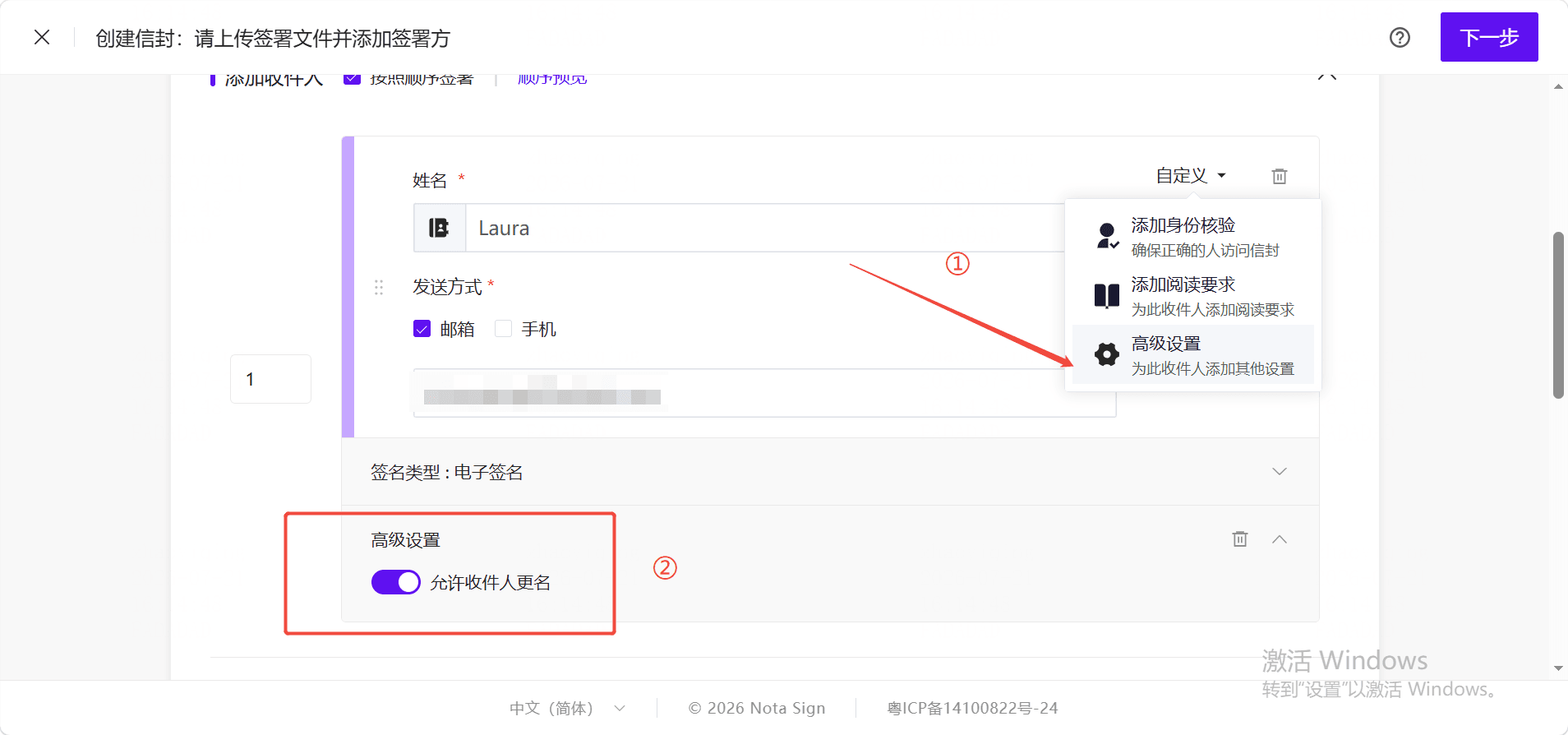
5. Click the [Custom] dropdown and select [Advanced Settings];
6. Enable or disable [Allow recipient to change name] as needed;
7. After completing the signing control settings, click [Send] to send the envelope.
III. Scope of Application
[Allow recipient to change name] only applies to regular recipients.
This setting is not displayed in the following roles or control scenarios:
- Electronic Seals;
- Indonesian Electronic Stamp Duty;
- Other special roles or signing methods that do not involve recipient name changes.
IV. Rules for Templates and Batch Send
1. Envelope Templates
In envelope templates, this setting is saved per role. When initiating an envelope using a template, the system initializes recipient settings based on the configuration in the template role.
If the administrator does not allow senders to adjust, the system will use the default value from the current sending settings.
2. Batch Send
In Batch Send, this setting is saved per role dimension. All recipients generated under the same role will use the same configuration, and the switch will not be displayed separately for each row of recipients.
3. Batch Send Templates
In Batch Send Templates, this setting is saved per template role. When using a template for batch sending, recipients generated under the same role will inherit the configuration from the template.
V. Rules After Changing Identity Verification Method
If the sender deletes, switches, or reconfigures the identity verification method while editing a recipient, the system may re-read the default value from the current sending settings.
- If the current sending settings allow recipients to change their name, the recipient will default to allowing name changes;
- If the current sending settings do not allow recipients to change their name, the recipient will default to not allowing name changes;
- If the sender still has adjustment permissions, they can modify the setting again after resetting.
To avoid configuration inconsistencies, it is recommended to check the recipient’s identity verification method and name-change permission settings before sending.