
Vietnam FPT Enterprise Digital Certificate
This article explains the documents required to apply for an FPT enterprise digital certificate, how to complete the application form, and how to submit your application, confirm certificate information and provide paper originals where required.
Download Forms
- Certificate Application Form (GIẤY ĐĂNG KÝ CẤP MỚI/GIA HẠN/BỔ SUNG CHỨNG THƯ SỐ FPT-CA): Complete and submit this form when applying.
- Certificate Information Confirmation Form (Giấy xác nhận thông tin chứng thư số): Complete and sign this form after receiving the certificate and verifying that its information is correct.
The downloadable confirmation form is for reference. Use the version provided by Nota Sign after the certificate is issued.
I. Required Documents
Prepare the following documents before applying:
| Document | Requirement |
|---|---|
| Certificate Application Form | Complete the Certificate Application Form |
| Business Licence | Provide a copy |
| Tax Registration Certificate | Provide a copy |
| Legal Representative’s Identification Document | Provide a copy of the legal representative’s Vietnamese citizen identification document or passport |
II. Applying for an FPT Enterprise Digital Certificate
1. Complete the Certificate Application Form
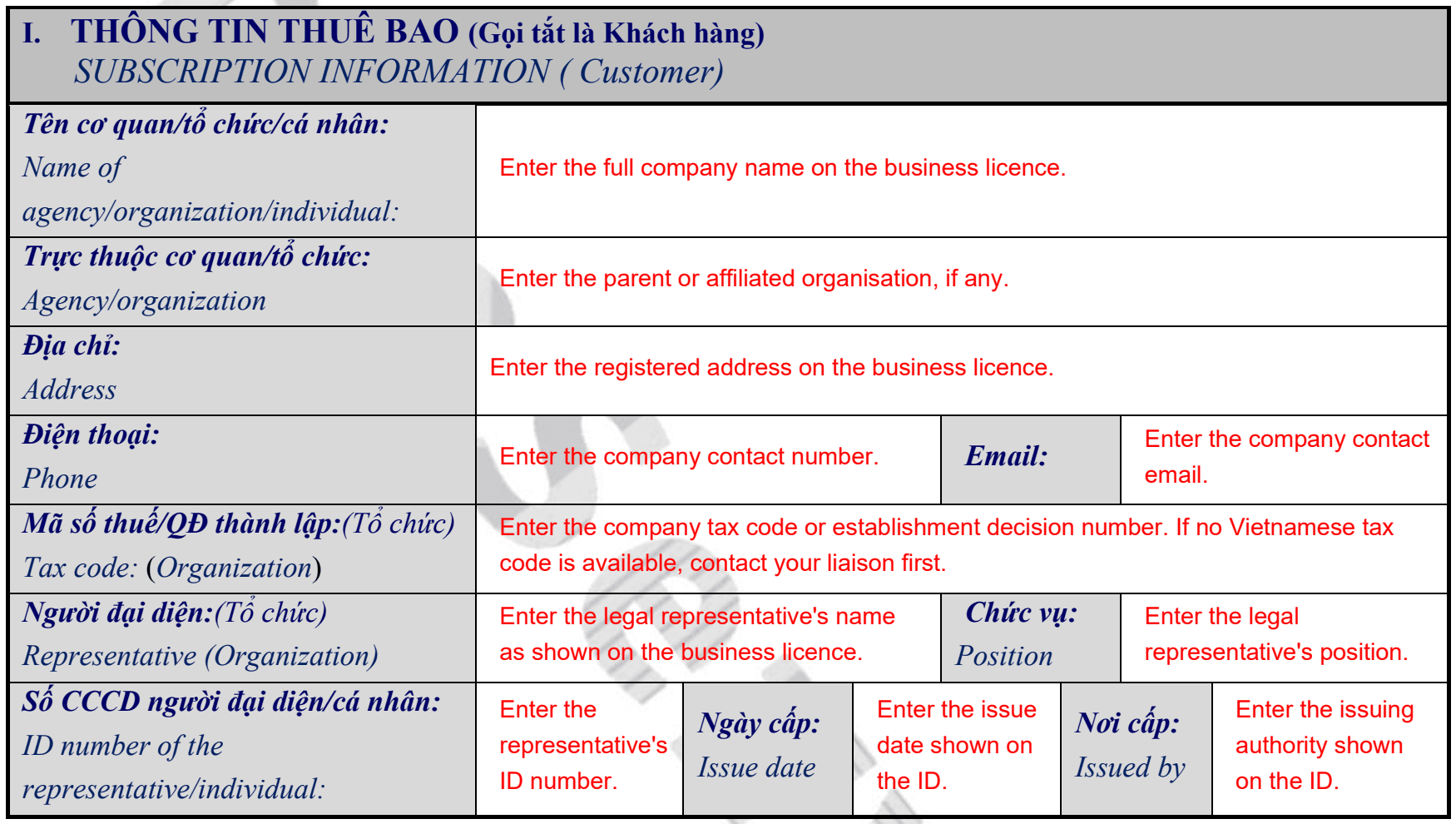
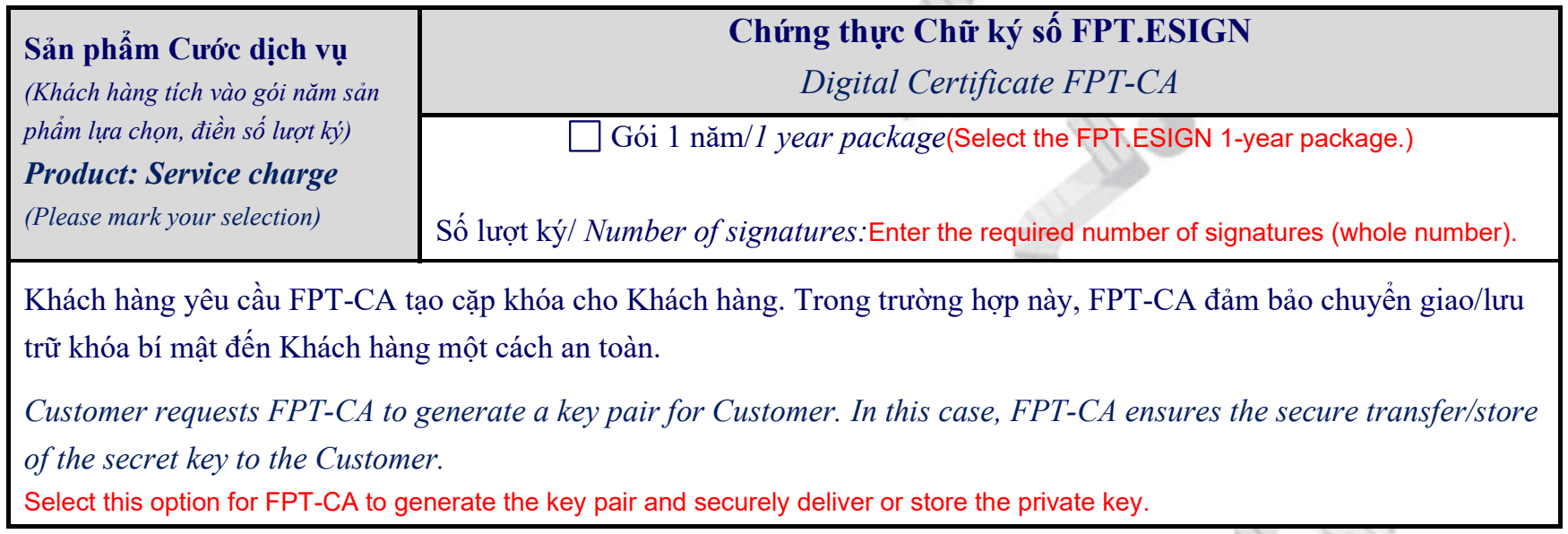
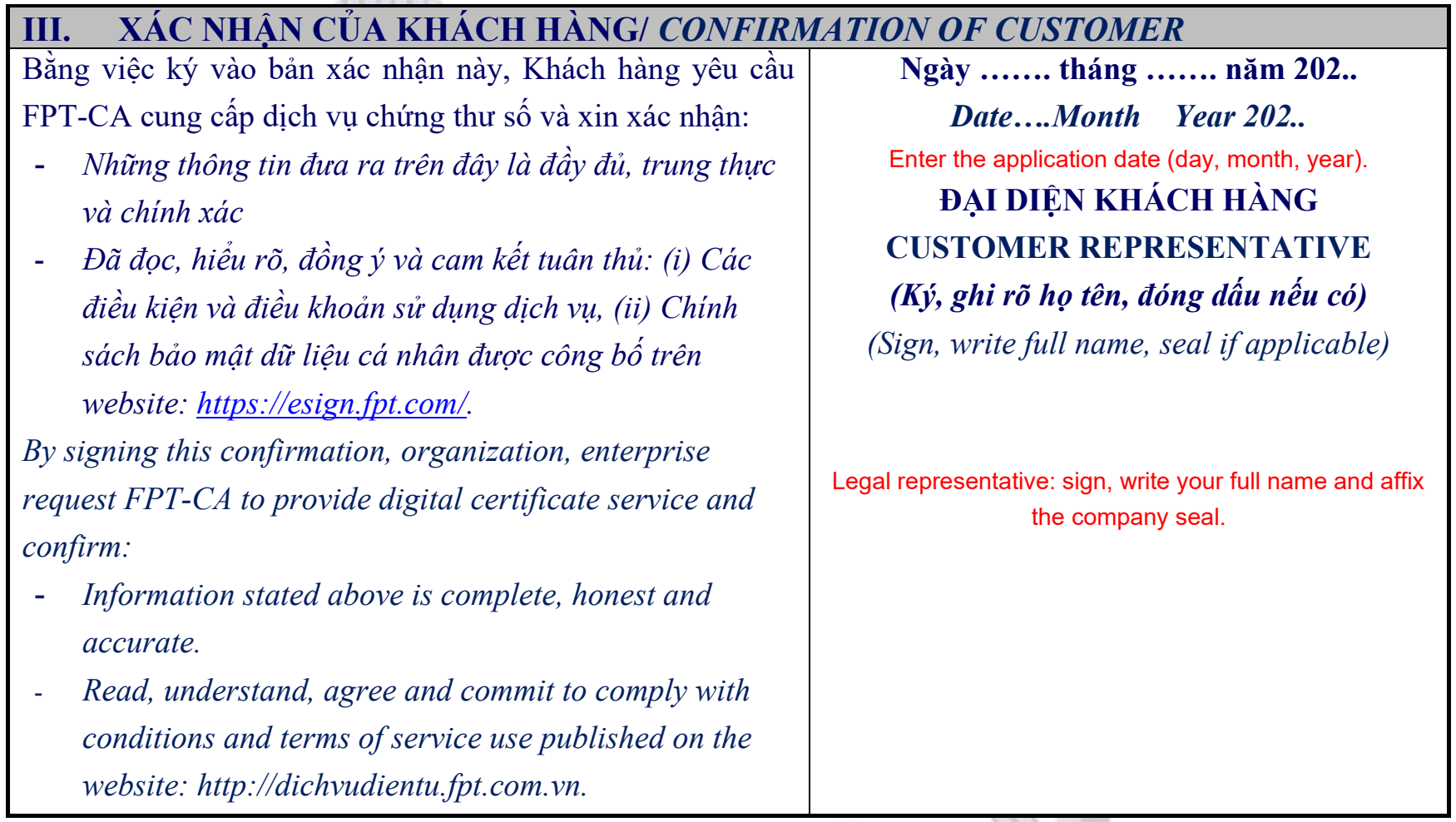
Download the Certificate Application Form using the link under “Download Forms” at the beginning of this article. The form consists of four sections. Complete all sections as instructed.
A. Company Information
B. Service Plan
C. Certificate Recipient
Enter the details of the person authorized to receive the service and confirm the certificate information on behalf of the company.
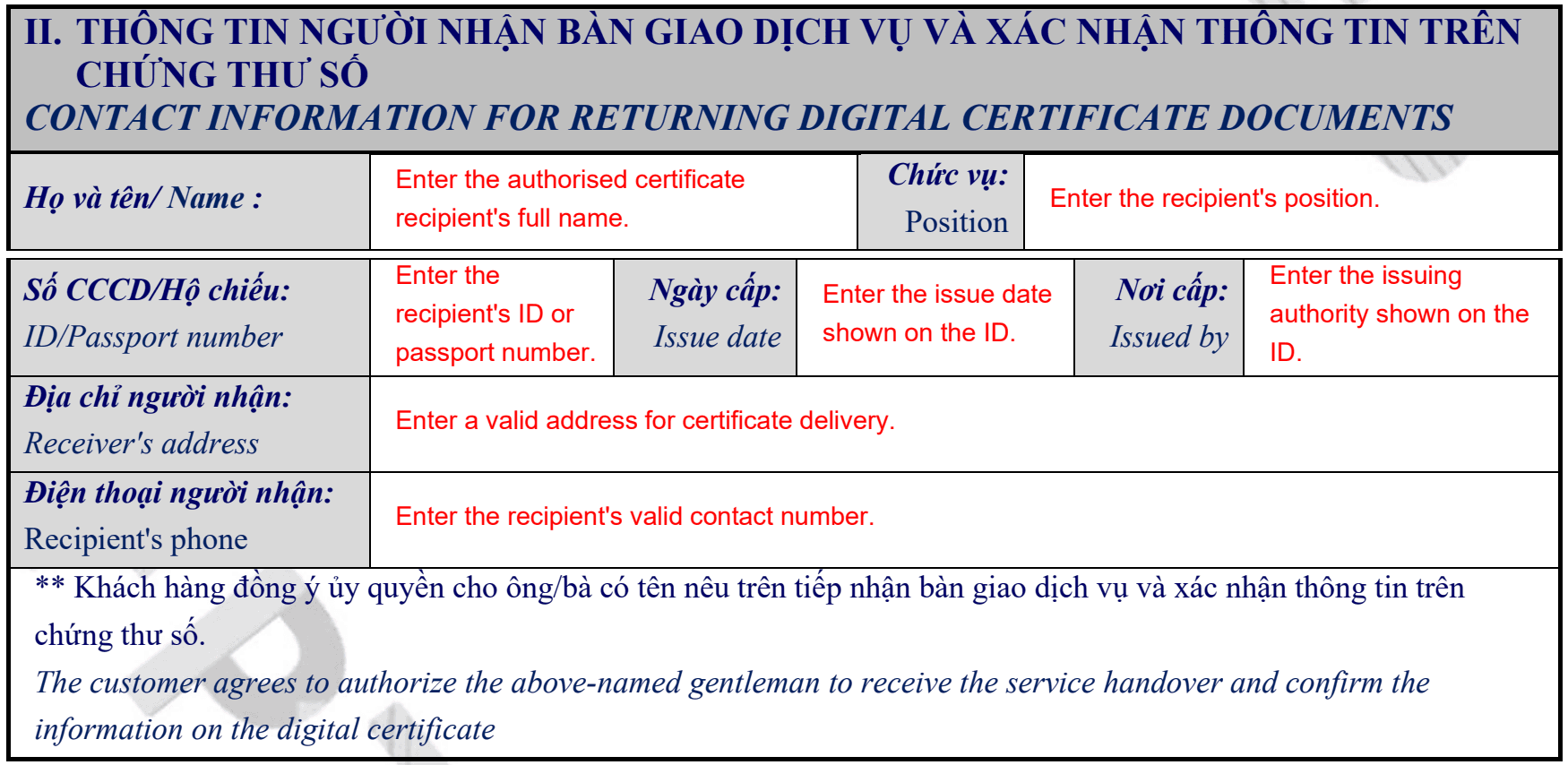
If another person will receive the certificate on your behalf, specify that person’s details in this section.
D. Company Confirmation
2. Sign and Submit the Application Documents
After completing the application form, choose the signing method that applies to your company:
- If you already have a qualifying digital signature or seal: If your company already holds a valid digital signature or seal certified by the Vietnamese government and accepted for this application, use it to sign the application documents and submit the electronic files to Nota Sign. You will not need to submit paper originals later.
- If you do not use such a digital signature or seal: Sign the application documents by hand and affix the company’s official red seal. Submit scanned copies to Nota Sign for review first, then provide the paper originals as described in Step 5. A standard electronic signature cannot replace the qualifying digital signature or seal described above.
Submit the signed Certificate Application Form and electronic copies of the business licence, tax registration certificate and legal representative’s identification document together to Nota Sign. Contact Nota Sign Support for submission instructions.
3. Wait for FPT to Review the Application
After submitting your documents, wait for FPT to review your application. Provided the documents are complete and meet the requirements, review and service activation generally take approximately 2–4 business hours. Applications received in the morning are usually completed that afternoon; those received in the afternoon, the following morning.
4. Receive the Certificate Details and Sign the Confirmation Form
Once your application is approved and the certificate is issued, FPT.eSign will email you the certificate details, validity period, Agreement UUID (signing account identifier) and Passcode used for authentication.
Nota Sign will provide the Certificate Information Confirmation Form. Check the certificate and account information on the form. If everything is correct, sign it, affix the company seal and return it as instructed by Nota Sign.
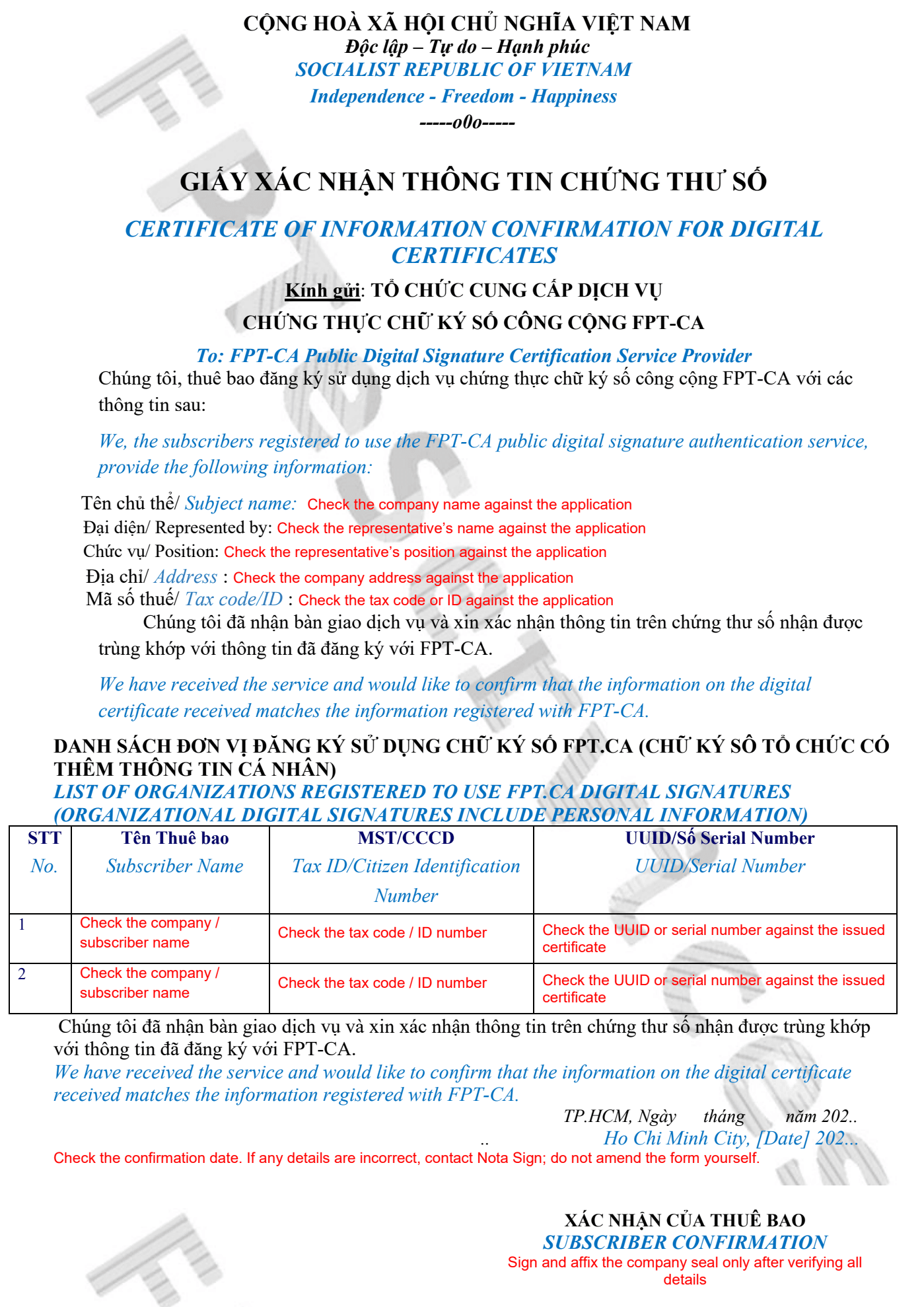
Note: If the certificate information does not match your application, do not sign the confirmation form. Contact Nota Sign Support for assistance.
5. Submit Paper Originals If Required
If you did not sign the application documents using a Vietnamese government-certified digital signature or seal that meets the requirements in Step 2, gather all relevant paper documents, including the signed and sealed application documents and Certificate Information Confirmation Form, and mail them to the address designated by FPT. They must arrive within 10 days of the signing account being issued.
Contact Nota Sign Support for the mailing address and the specific list of documents to send. The deadline applies to delivery, not dispatch.
If you signed the application documents using a qualifying digital signature or seal, you do not need to submit paper originals.
III. Frequently Asked Questions
1. What should I enter if the company does not have a Vietnamese tax code?
Contact Nota Sign Support to confirm which identification number and supporting documents can be used before completing the application form.
2. What should I do if the application information is incorrect?
- If you identify an error before signing the Certificate Information Confirmation Form, correct the information and resubmit the application documents through Nota Sign.
- If you identify an error after signing the form, contact Nota Sign Support for assistance with changing the certificate information.
3. Can another person receive the certificate on my behalf?
Yes. Specify that person’s details in Section C, “Certificate Recipient”, of the application form.