CFR Quick Sign
What is Quick Sign?
Under standard FDA CFR Part 11 compliance requirements, signers are required to re-enter their password for identity verification with every single signing action.
When the "Quick Signing" feature is enabled, the system optimizes the verification frequency. Authentication is only required whenaccessing the envelopeandcompleting the signing. This improves signing efficiency while maintaining compliance.
Enable CFR Quick Sign
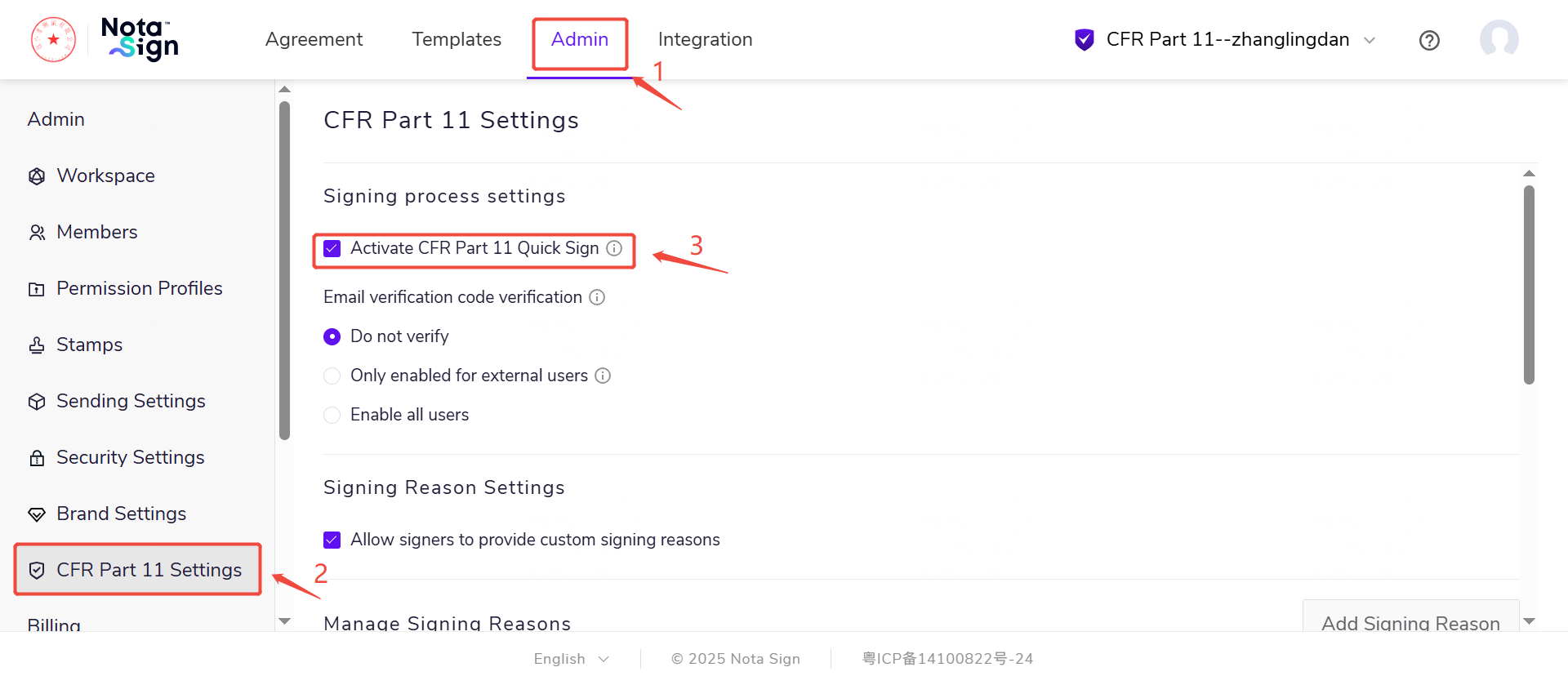
Log in to Nota Sign and navigate to the【Admin】page.
In the left-hand admin submenu, find and click【CFR Part 11 Settings】to enter the configuration page.
Check "Enable Quick Signing":Once selected, envelopes sent from this workspace will use Quick Signing mode. This requires identity verification only at two key points: accessing the envelope and submitting the completed signature. It skips repetitive verification for individual signature fields, thereby improving signing efficiency (while still meeting baseline compliance requirements).