Attach Audit Report to Completion Email
Beyond the four methods of downloading signed documents and audit reports, users can also choose to attach the audit report to the signing completion notification email. To ensure data privacy and optimize the recipient experience, users can determine the distribution scope of the attached audit report (whether to include recipients and senders) to prevent sensitive audit data from circulating in unnecessary emails.
Click【Admin】and find【Sending Settings】in the left-hand menu.
Locate the【Document Settings】module at the bottom of the page.
Configure【Attach audit report to email notification upon completion】.
This option controls whether the audit report is included as an attachment in the automatic "Signing Completed" notification email sent when the signing process ends.
Users can select one of the following three modes from the dropdown list according to their needs:
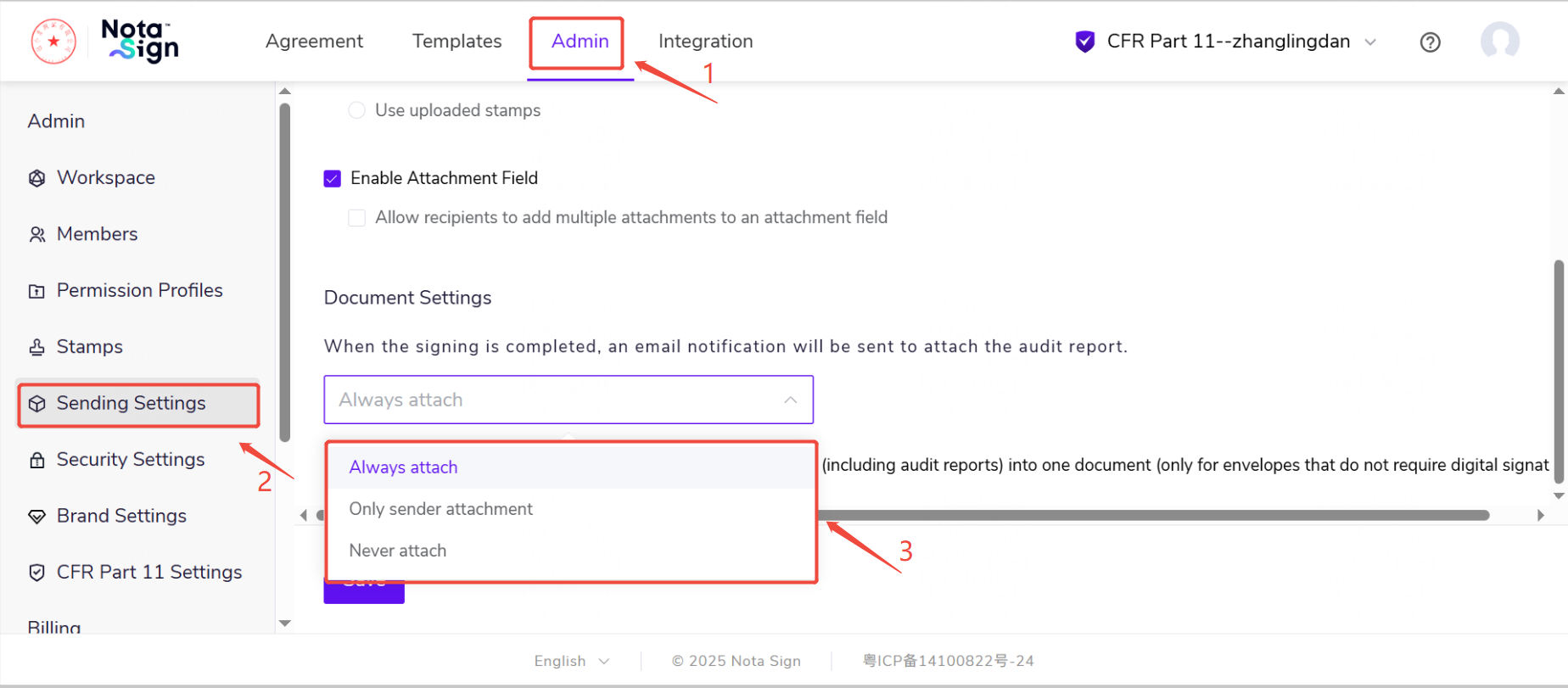
Always:The sender and all recipients (including CCs) will receive the completion email with the audit report attached.
Sender Only:Only the sender will receive the email with the audit report attached; emails sent to recipients and CCs will not contain the audit report.
Never:Emails sent to the sender, recipients, and CCs will not contain the audit report.
If the audit report is attached to the email, users can access it directly from their mailbox after the signing concludes.