
Merge Signed Documents with Audit Reports
If a user wishes to obtain both the signed documents and the audit report simultaneously after signing is complete, they can configure the settings below to merge the signed documents with the audit report. Note: This feature only applies to envelopes thatdo not require digital signatures.
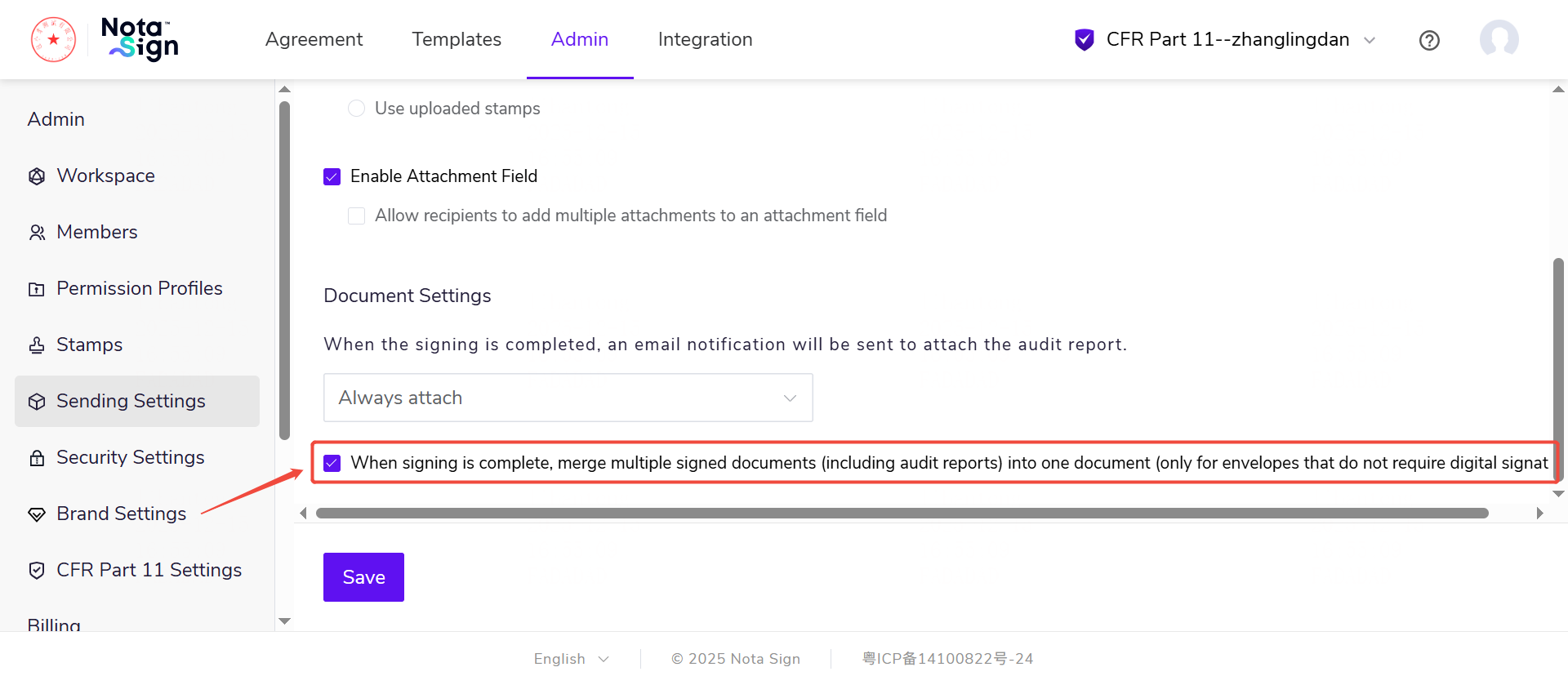
Click[Admin]and find[Sending Settings]in the left-hand menu.
Locate the[Document Settings]module at the bottom of the page.
Configure[Merge multiple signed documents into a single file upon completion]:
Unchecked:Keep files separate. Signed documents and the audit report will exist as independent files.
Checked:Merge for archiving. The system will automatically merge all signed documents and the audit report (if permissions allow) into a single PDF document.
If the user selects "Merge files" and there is only one final document, the system will download the PDF file directly.
If the user selects "Do not merge," the system will automatically package and download a ZIP archive.
Additionally, users can still download the standard audit report separately in the[Signing Log].
Special Cases
Attachments uploaded by participants (documents not subject to signing) are not controlled by the "Merge Configuration" mentioned above. They will always remain as independent files, and the receiving rules remain consistent with the existing logic.